API Access Details
Complete configuration of an API Access with all its sections
What is it?
The API Access Details page is where you can configure all the options for a specific API Access. This page has 5 tabs that let you fully customize your business on the TuTike platform.
Details Page
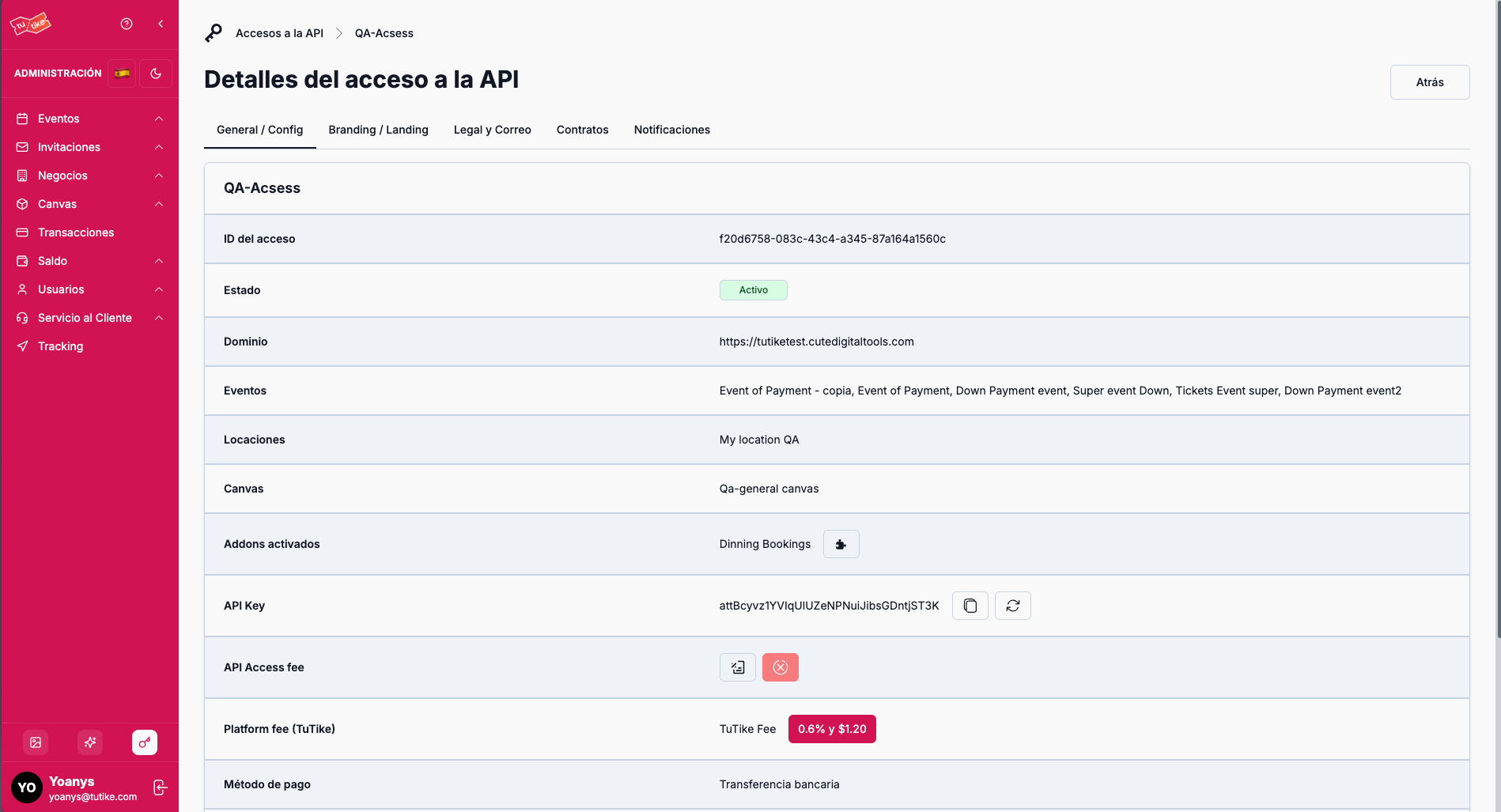
The details page has 5 tabs:
- General: General information of the API Access, API Key, and configurations
- Branding & Landing: Configuration of your business's personalized landing page
- Legal & Email: Configuration of notification email styles
- Contracts: Contracts signed with TuTike
- Notifications: Administrative emails to receive notifications
General Tab
On this tab you will find all the general information of the API Access:
- API Access information: Name, status, and general details
- API Key: Key to connect to the TuTike API from an external server or application
- Active addons: Additional modules active in your API Access (e.g., the reservations module for businesses)
- Configurations:
- API Access fee: General fee you can set for all your events and charges through the platform
- Platform fee: Commission TuTike charges you per transaction
- Validity: How long your API Access is valid
The API Key is your access key to integrate your external systems with the TuTike platform. Store it securely and do not share it with unauthorized third parties.
Branding & Landing Tab
This tab lets you configure the personalized landing page for your business within the TuTike website.
What is the Landing Page?
The landing page is a dedicated page specifically for your business within the TuTike website. On this page users can see:
- Your business rating: Accumulated rating for your business on TuTike, based on user ratings for your events or restaurant
- Business information: Complete details about your business
- Map: Your business location on the map
- Upcoming events: Upcoming events you have scheduled
- Past events: Events that have already taken place
- Gallery: Images of your business or events
Landing Page Configuration
From this section you can configure:
- Map location: Address to appear on your page
- Address: Physical address of your business
- Logo: Logo image for your business
- Social media: Links to your social media to appear on your landing
- Main banner: Main image for your landing page
- Visibility: Define whether the page will be visible to users or not
Edit Landing Style
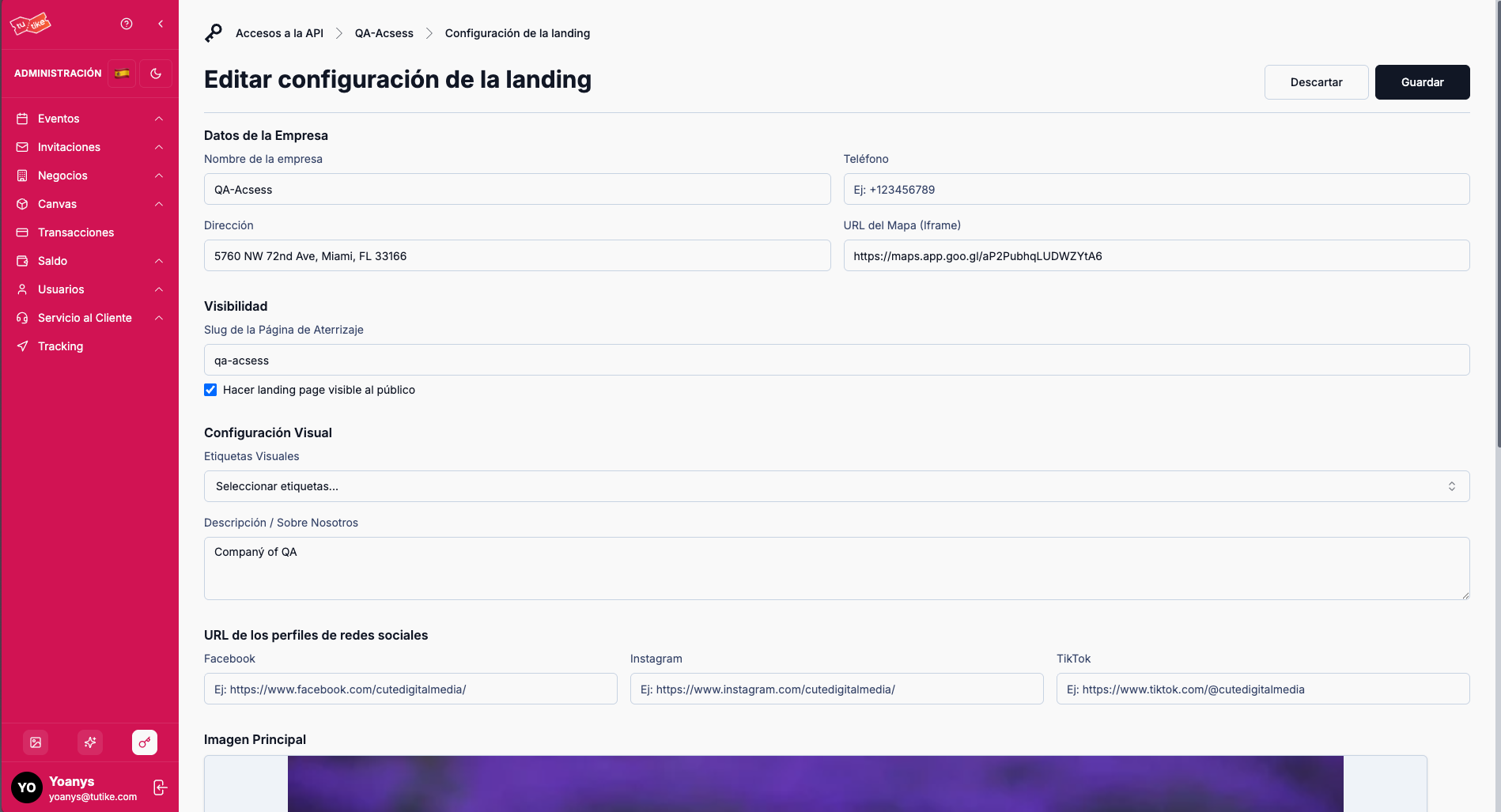
By clicking to edit the landing style, you can configure all these details:
- Social media links: Assign your social media links to appear on your landing
- Visual tags: Add visual tags to your landing that users can see below your business name (e.g., accessible, parking, alcohol sales, etc.)
Legal & Email Tab
This tab lets you configure the styles of notifications that will reach your users.
Notification Style Configuration
When a user purchases a ticket, the email arrives from TuTike but with your business logo. From this section you can modify:
- Email background color: Custom background color for emails
- Text color: Text color for emails
- Button color: Button color in emails
This lets you maintain your business's visual identity in all communications with your customers.
Contracts Tab
On this tab you will see contracts you have signed with TuTike.
Contracts with TuTike
Normally, during the onboarding process with TuTike, a contract is made that is digitally signed between TuTike and the client. On this tab you can:
- View the contract: Access a copy of the signed contract
- Follow up: Review the status and details of your contracts
- Review terms: Review the agreed terms and conditions
Notifications Tab
This tab lets you configure the administrative emails where you want to receive notifications.
Administrative Notification Configuration
From this section you can add all the administrative emails where you want to receive notifications about your businesses. You can receive notifications for:
- Bookings: Every time a reservation is made at your business
- Cancellations: Every time a reservation is cancelled
- Relevant information: Any important information about your businesses or events
This lets you stay informed in real time about what is happening with your businesses.
What is it for?
The API Access Details page lets you:
- Configure your integration: Access your API Key and configure your fees
- Customize your presence: Configure your personalized landing page with your visual identity
- Adjust email styles: Customize the colors and styles of emails sent to your users
- Manage contracts: Review and manage your contracts with TuTike
- Configure notifications: Define which administrative emails you want to receive to stay informed