Discount Coupons
Codes customers enter to get discounts
What are discount coupons?
Discount coupons are codes that customers enter manually during the purchase process to get a discount. Unlike promotions, the customer must have the code and type it when making their reservation.
How to create a coupon
Coupons are created within the event editor:
- Go to the event editor
- Below the promotions configuration, click "Create discount coupon"
- Complete the form fields
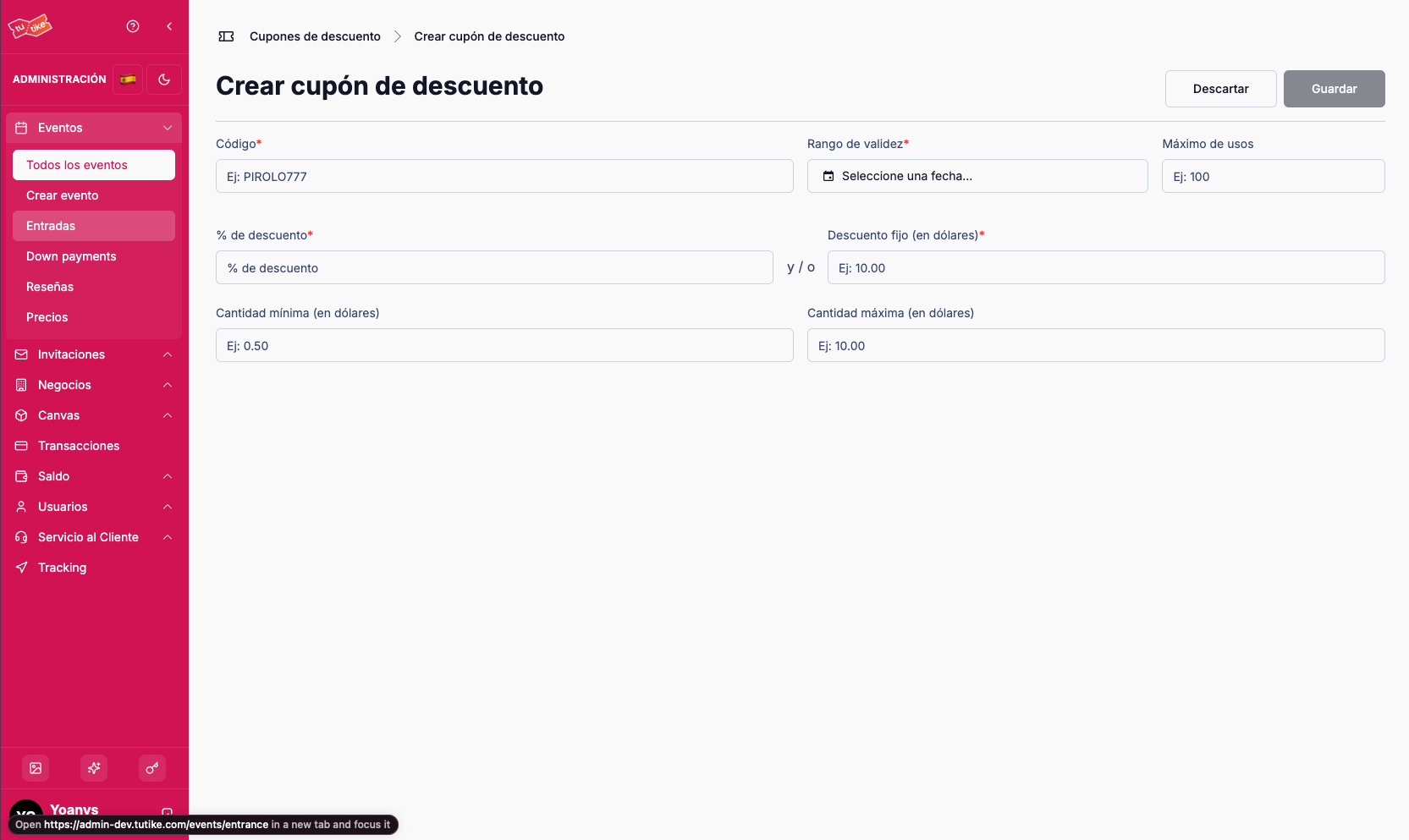
Coupon Fields
| Field | Description |
|---|---|
| Code | Unique code the customer enters when booking (can be any code you want) |
| Validity date | Date from and until when the coupon is valid |
| Maximum uses | Limit on how many times the coupon can be used (works the same as promotions) |
| Discount percentage | Discount as a percentage (e.g., 10%) |
| Fixed dollar discount | Fixed discount amount (e.g., $5) |
| Minimum discount amount | Minimum amount that will be discounted for the user |
| Maximum discount amount | Maximum cap on the amount that can be discounted for the user |
Discount Configurations
You can configure the discount in different ways:
- Percentage only — e.g., 10% discount
- Fixed amount only — e.g., $5 discount
- Both combined — e.g., 10% + $5 discount
Maximum Discount Cap
You can set a maximum cap. For example:
You configure a 10% discount with a maximum of $10.
If the customer's purchase is $150, the 10% would be $15, but since the maximum is $10, the customer will only receive a $10 discount.
If you do not configure this cap, the full discount configured in the coupon will be applied.
How it works for the customer
Once the coupon is created:
- The coupon is automatically assigned to the event
- Customers, when booking in the form, can enter the coupon code
- If the code is valid, the configured discount is applied
- The final price is calculated automatically
Coupons are ideal for targeted marketing campaigns, rewards for loyal customers, or distributing discounts in a controlled way to a specific group.