Accumulated Balance
Dashboard for viewing and managing the accumulated balance from your events in agent mode
What is it?
The accumulated balance is the dashboard where you can see the money generated by each of your events through agent mode. In this mode, TuTike collects your sales payments and you can request withdrawals of those funds when they are available.
This screen lets you monitor in real time how much money you have accumulated per event, view the status of each balance, and request withdrawals when the money is ready to be transferred to your bank account.
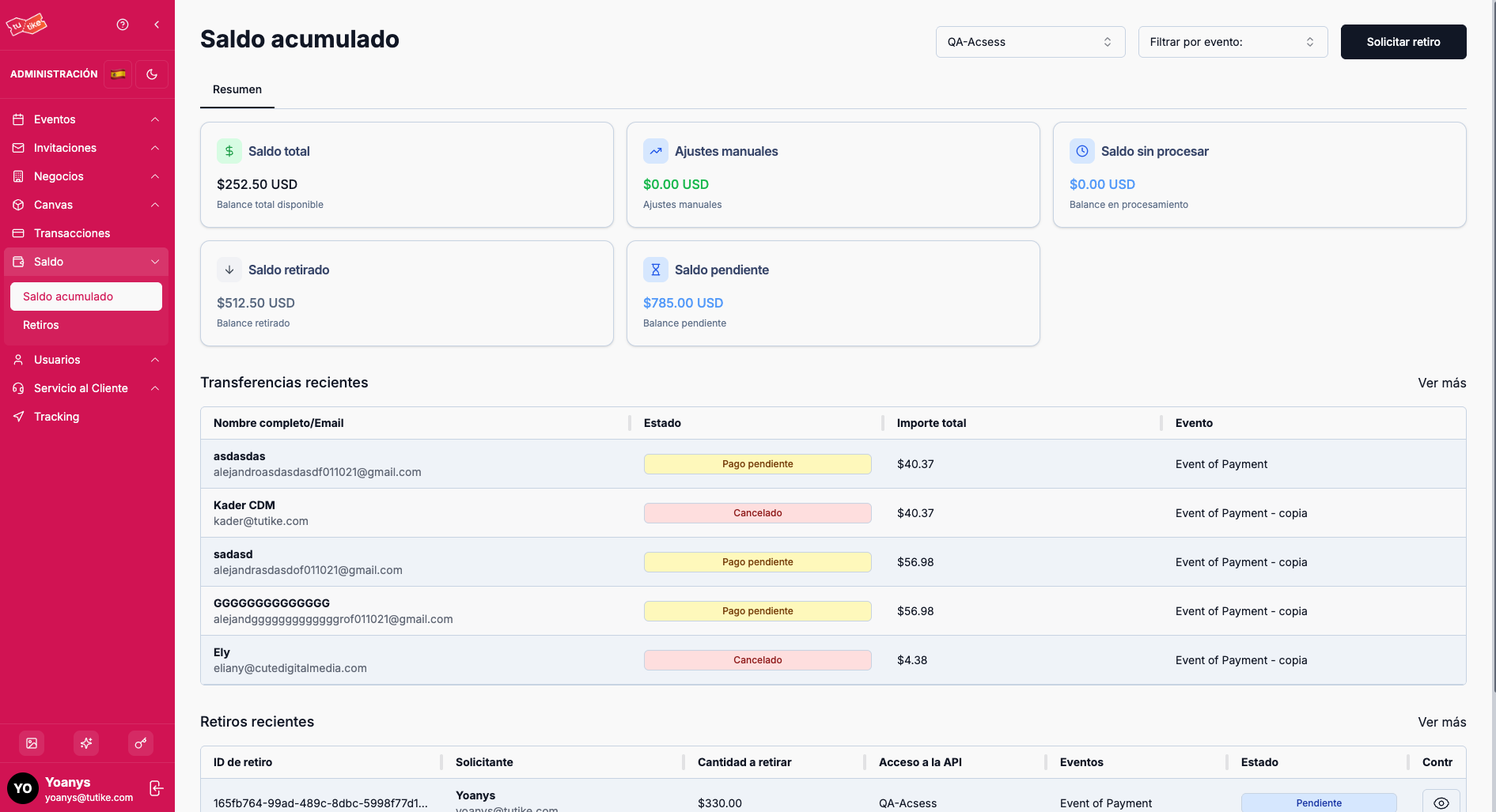
Available Filters
At the top of the screen you will find two filters that let you customize the view:
| Filter | Description |
|---|---|
| API Access | Select a specific business chain to view the balance for all its associated events. If left open, you will see the balance for all your business chains. |
| Event | Select a specific event to view the accumulated balance for that event only. If left open, you will see the available balance for all your events. |
The filters allow you to view balances in general (all your events) or specifically (a single event). The summary cards and tables will update automatically based on the filters you select.
Summary Cards
Below the filters you will find five cards that show the financial status based on the selected filters:
| Card | Description |
|---|---|
| Total balance | The total processed balance from all your events or the selected event. This is the money that has already been collected and processed by TuTike. |
| Manual adjustments | Extra charges or adjustments made to the balance. These adjustments may be for transactions outside the system that need to be made to close the balance for an event. |
| Unprocessed balance | The balance that has already been collected but has not yet been processed or deposited. This money is still in the payment gateway's possession. |
| Withdrawn balance | The money that has already been withdrawn from this event or in general and transferred to your bank account. |
| Pending balance | The balance that is already available for withdrawal. This is the money you can request to withdraw right now. |
The pending balance is the amount you can request to withdraw. Once the TuTike administrator approves your request, the money will be transferred to your bank account.
Recent Transfers
In this section you will see a list of the last five transfers (payments) received by your event or events based on the selected filters. This table gives you a quick view of the most recent income without needing to go to the full transaction list.
"View more" Button
At the bottom of the recent transfers table you will find a "View more" button that will take you directly to the full transaction list, where you can see the complete payment history with more details.
Recent Withdrawal History
You will also find a table with your recent withdrawal history. Here you can see the withdrawal requests you have made, their status (pending, approved, rejected), and other relevant details.
Requesting a Withdrawal
When your event has available balance to withdraw (pending balance), you can request that money to be transferred to your bank account.
How to request a withdrawal
- Make sure your event has available pending balance.
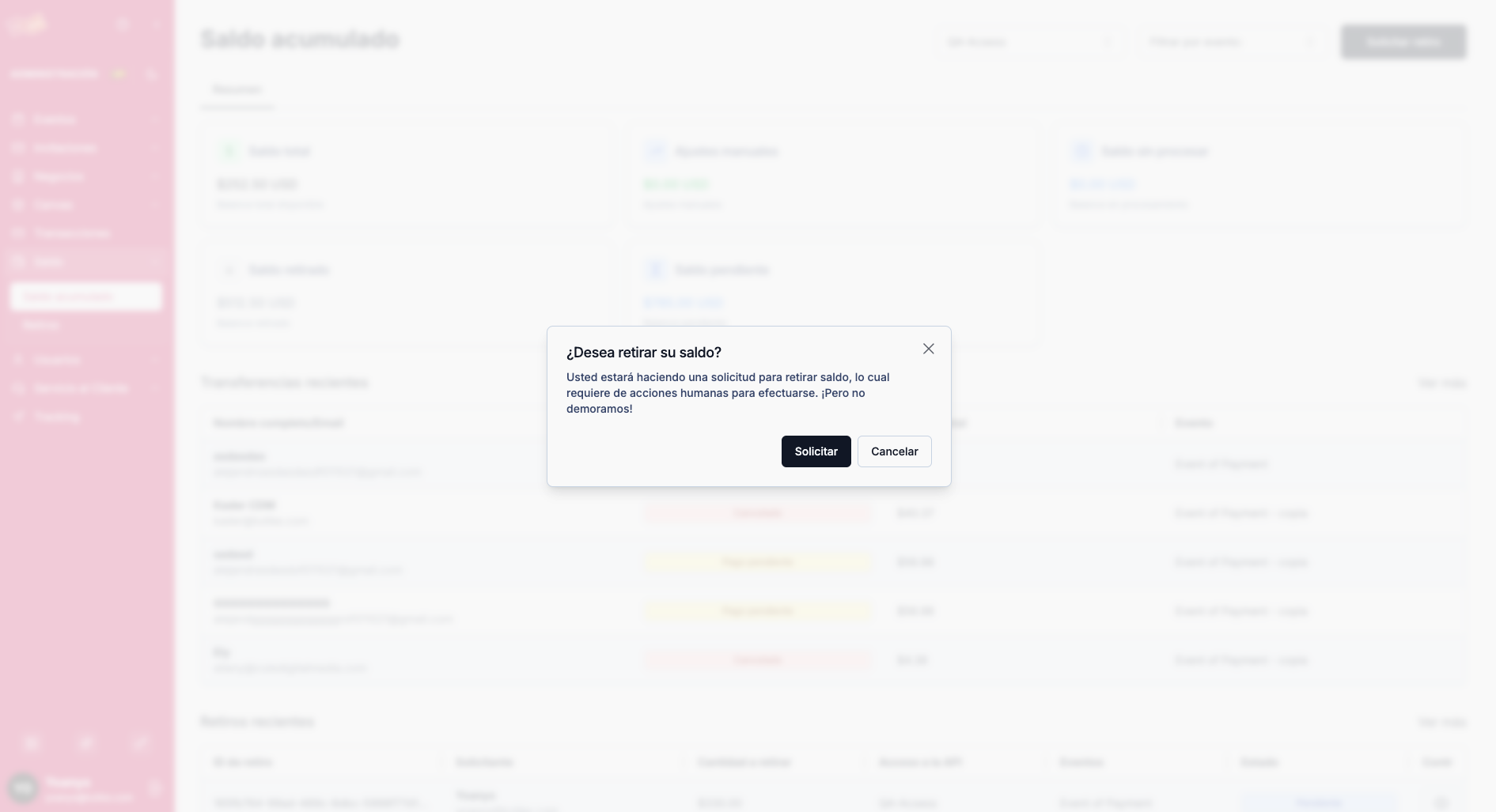
- Click the "Request withdrawal" button located in the upper right corner of the screen.
- A modal will open asking you to confirm that you want to request the withdrawal of the available pending balance.
- Confirm the request.
Approval Process
Once you request the withdrawal:
- The request enters pending approval status.
- The TuTike administrator receives a notification of your request.
- The administrator reviews the request and decides whether to approve or reject it.
- If the administrator approves the request:
- They transfer the money to your bank account.
- They update the status of your request to "approved."
- They attach the corresponding payment evidence (transfer receipt) to your withdrawal request.
- If the administrator rejects the request:
- The money remains in your pending balance.
- The administrator may include a reason for the rejection.
The withdrawal process is not automatic. A TuTike administrator must manually review and approve each request to ensure the security and traceability of all transfers.
What is it for?
The accumulated balance lets you:
- Monitor your income: See in real time how much money each of your events has generated.
- Control your funds: Know exactly which money is available for withdrawal and which is still being processed.
- Manage withdrawals: Request withdrawals of your funds when available and track the status of each request.
- Full transparency: Have complete visibility of the money lifecycle from when it is collected to when it is transferred to your account.
Remember that this module is designed for agent mode. If you operate in direct mode, payments are transferred automatically to your bank account and you do not need to request withdrawals through this dashboard.