Attributions
Management of tracking attributions for your marketing campaigns
What is it?
The Attributions section is where you can create and manage custom tracking links for your marketing campaigns. Here you can generate short links with custom UTM parameters that allow you to track the performance of your campaigns on your marketing platforms (Meta, Google Analytics).
This screen lets you measure which campaigns generate the most sales or reservations, optimize your advertising spend, and make decisions based on real data.
Tracking Page
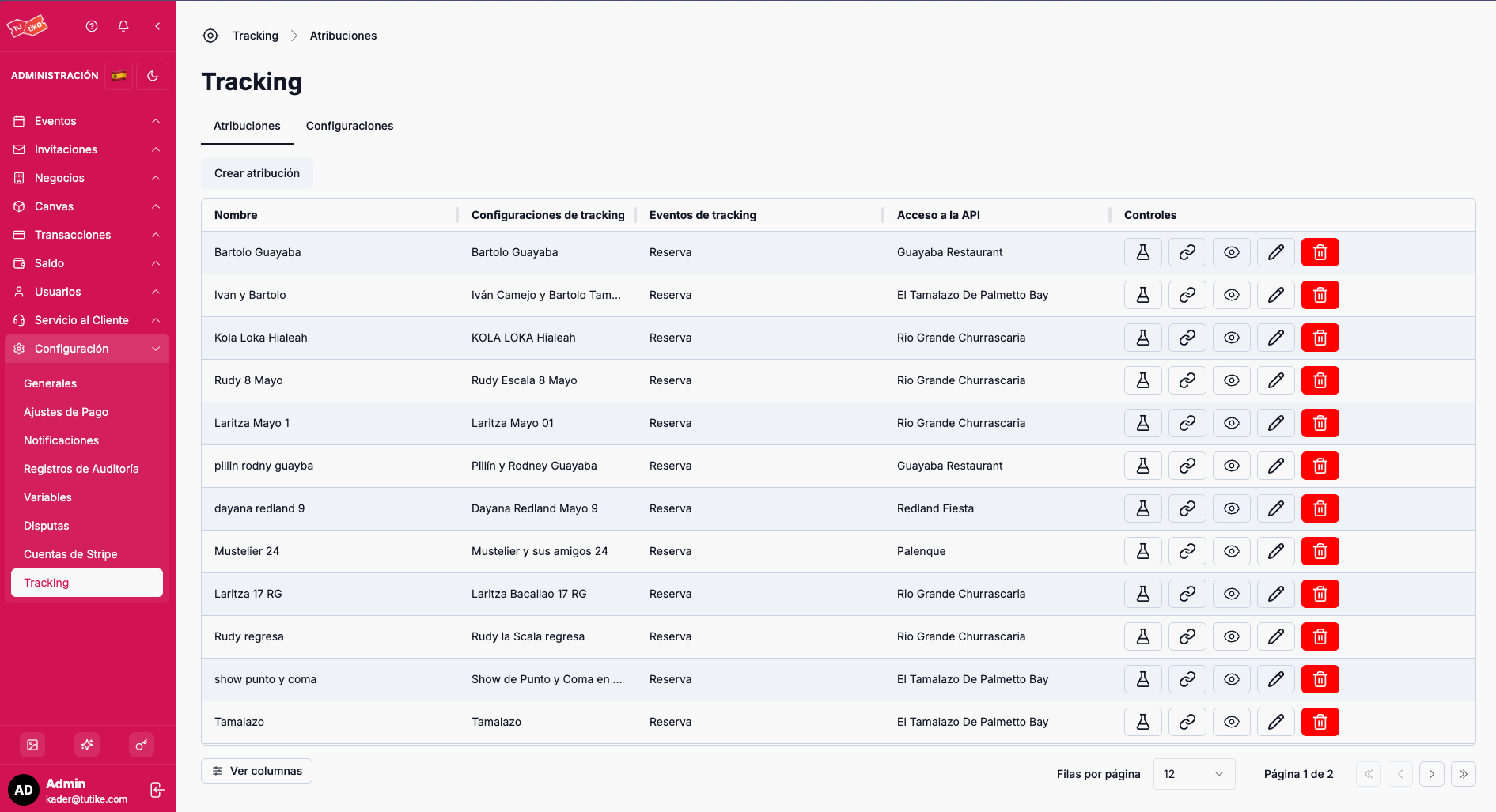
The tracking page has two tabs:
- Attributions: Management of tracking links for your campaigns
- Configurations: Management of connections with your marketing platforms
Create Attribution Button
On the Attributions tab you will find the "Create attribution" button. Clicking it will open a modal where you can configure a new tracking attribution for your campaign.
Attribution Form Fields
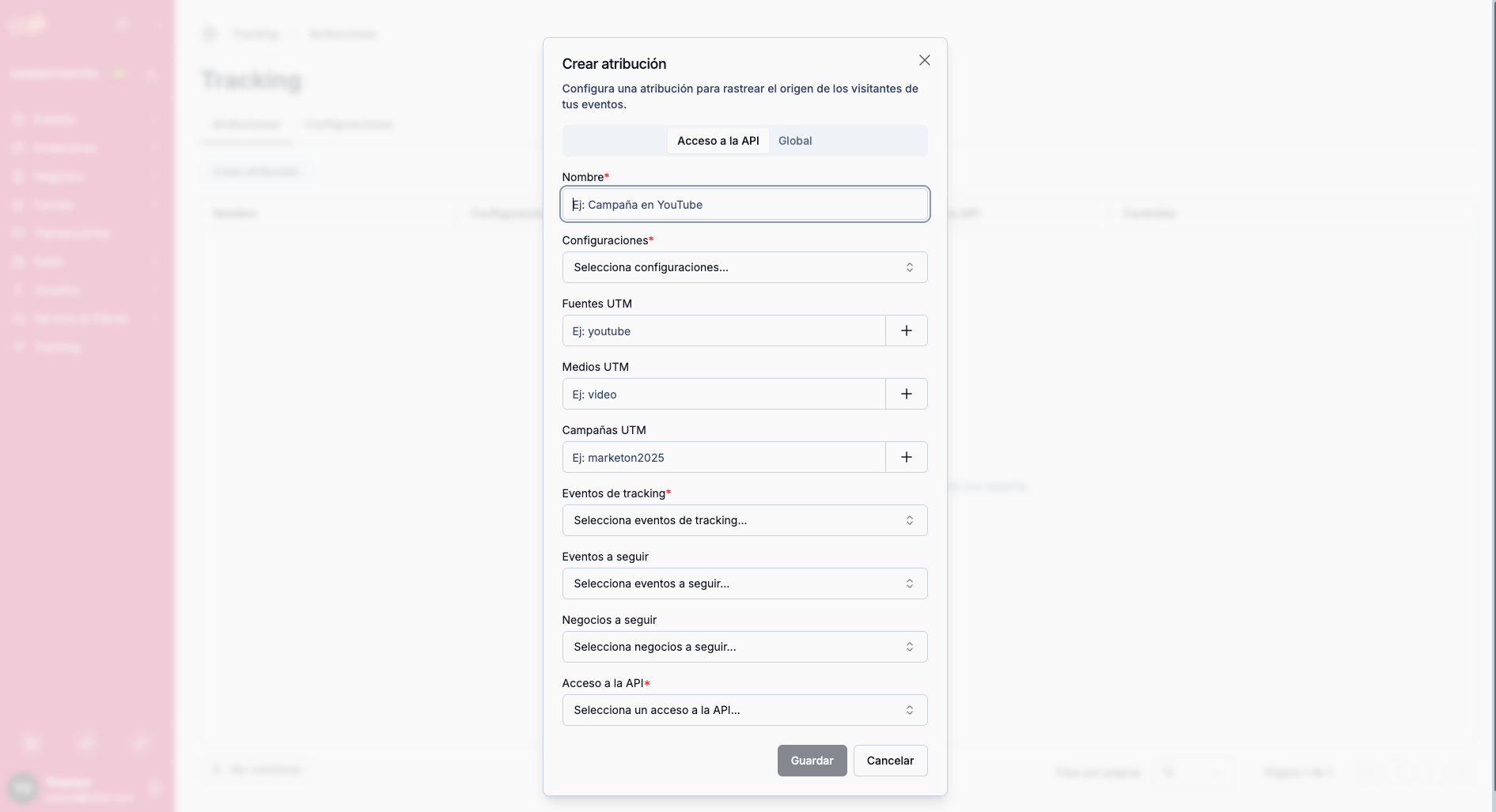
| Field | Description |
|---|---|
| Campaign name | A representative name to identify this attribution (e.g., "Summer 2024 Campaign") |
| Configuration | Select the previously created tracking configuration (Meta or Google Analytics) |
| UTM parameters | Add custom UTM parameters (source, medium, campaign, etc.) for the parameters you want in your URLs |
| Tracking events | Select the event you want to track: reservation, add to cart, or initiate payment |
| Events to follow | If you want to track sales for a show or event, select the specific event |
| Businesses to follow | If you want to track reservations at a restaurant or business, select the specific business |
| API Access | API Access that the event or business being tracked belongs to |
Tracking events let you measure different stages of the conversion funnel: reservation (completed), add to cart (interest), or initiate payment (purchase intent). Choose the event that best fits your measurement goals.
Short Link
Once the attribution is created, the system automatically generates a short link that you can easily share in your marketing campaigns (social media, email, advertising, etc.).
When an end user clicks this link:
- They are redirected to the original event or business link
- The configured tracking parameters are automatically added
- The system tracks the corresponding event you configured
- The tracking signal is sent to your marketing platform (Meta or Google Analytics)
Attributions Table
The main table shows all your tracking attributions with the following information:
| Column | Description |
|---|---|
| Attribution name | Representative name of the campaign |
| Configuration | Associated tracking configuration (Meta or Google Analytics) |
| Event | Event or business being tracked |
| API Access | API Access the event or business belongs to |
| Controls | Available options to manage the attribution |
Available Controls
In the controls column you will find the following options:
| Action | Description |
|---|---|
| Test | Sends a test event to your marketing platform to verify that the attribution configuration was set up correctly. You will be able to see the purchase or reservation in Meta or Google Analytics and the platform will tell you whether the event was sent correctly. |
| Copy link | Copies the generated short link to share it easily on social media or other marketing channels |
| View details | Access the detailed information for the attribution |
| Edit | Modify the attribution data (name, configuration, UTM parameters, events, etc.) |
| Delete | Remove the attribution from the system (requires confirmation) |
Use the Test button before launching your campaign to verify that the tracking configuration is working correctly. This will let you detect any issues before investing in advertising.
What is it for?
The Attributions section lets you:
- Create tracking links: Generate short links with custom UTM parameters for your campaigns
- Track conversions: Measure which campaigns generate the most sales or reservations
- Optimize your advertising spend: Identify which channels and messages work best
- Test before launching: Verify your tracking configurations before investing in advertising
- Centralize your campaigns: Manage all your tracking attributions from one place
Tracking attributions let you close the loop on your marketing campaigns: from the user's click to the final conversion. By measuring the real performance of each campaign, you can optimize your investment and maximize your return.